Hello, my name is Kru and for some reason you've stumbled upon my tiny corner of the internet. On the off-chance that you're not lost, stay a while and listen!
My current hobby project is building a hand-crafted game engine from scratch. If that sounds like fun, check out my devlog and follow my progress (spoiler: I am making it up as I go).
I'm in Treble Now
When talking to people about the game I'm building, I often get asked why I'm trying to do everything myself. Writing the engine makes sense, I've dedicated my entire life to programming. Even creating the 3D models isn't entirely far-fetched factoring in my experience over the years. But, sound effects? Music? That's where I fall off the train.
Just Do Things
Back in school, I enjoyed music class, but I was absolutely terrible at it. The only thing I ever really learnt was how to play Twinkle Twinkle Little Star. I tried to commit later in life to learning piano again but that got just about as far. Needless to say I don't know music theory, composition, or a lot about instruments (air drums aside). The most important thing to have in my opinion when trying to do anything in life is a strong grasp of the end goal. I know what I want it to be, and I know what I like and don't like. Maybe you'd call that having taste? Not sure.
Obviously I could point to any video game soundtrack I love; pretty much anything by Russell Brower, Jason Hayes or Jeremy Soule. That's tasty! That's also very unrealistic. I'm not an award-winning composer. I'm not even a composer. I don't even own an instrument anymore. But there's a particular flavor of music I love that sits within reach, it doesn't require an orchestra, and it fits the art style of the game (also influenced by lack of experience in that department) perfectly: synthesized music.
Some inspiring examples of this would be The Elder Scrolls: Daggerfall, The Secret of Monkey Island, or where I spent a lot of my younger years, Old School RuneScape.
Make Some Noise
A common approach a lot of games like this did was to use a soundbank. This takes pre-recorded samples (e.g notes of an instrument) and plays them in sequence to form a song. Not really knowing where to find a great source of these or how to make them, I decided to go one step further down the rabbit hole to how games from the Sega Genesis or NES would make noise; frequnecies and math.
Have you ever thought about how a computer can make sound? Not just a song but maybe someone talking, or a recording of something. It's not by trapping the souls of those people in the machine. At its simplest, sound from a computer is a list of numbers. A single frequency is the simplest tone. Here's a single frequency.
Funnily enough, that's the exact sound that plays in my head when people start talking about sports. How does that beep become Beyoncé's greatest hits or an incriminating phone call by a government official? Oscillation. Play the right frequencies at the right time, and you can make anything. A music CD is played at 44,100 Hz. That means it plays 44,100 samples every second, each one at the speaker's position. For our purposes, we'd be going for a modest 22,050 Hz.
What's fun to think about is because everything a computer can play is quite literally a sequence of numbers arranged in exactly the right way, that means it is theoretically possible, if you laid out the right numbers in the right order, to create a sequence that when played is Dolly Parton's cover of Numb by Linkin Park that never existed, or a phone call between your mother and the King of England that I presume didn't happen.
Signal to Noise
Okay, so we can make the computer beep. What next? The first ingredient is maths. Sine, square, sawtooh, triangle. We also need noise, which we can generate using xorshift. We take a integer, XOR it with shifted copies of itself three times and repeat. This creates a stream of bits that are "random" (they're deterministic by seed, like a Minecraft world, but are suitable to create randomization here).
Envelopes are important, just not the kind you send a Christmas card in. Right now our waves are either on or off. An envelope is a volume curve we can use in different ways to adjust how a note plays. In this example, our solid beep now sounds like a fasten seatbelt warning on an airplane.
Starting to see how we can already make sound effects? Now let's throw in some vibrato and tremolo. Vibrato is where you wiggle the pitch, and tremolo is where you wiggle the volume. This creates human-like expression in the sound. Below is an example of vibrato. Or, alternatively, the sound of an alien abduction. And yes, I'm sure wiggle is the correct technical term.
Another trick I learnt on this journey is Karplus-Strong string synthesis. An reductive explanation is, imagine a guitar string when you pluck it and how the sharp edge disapates with time. Fill a buffer one wave long with noise, then loop it, averaging neighbours each pass so it gets smoother and quieter. Unlike the envelope approach this is a physical model, so it's much better at making string instruments like a harp sound authentic.
Next we can do frequency modulation (FM synthesis), which is where we use a sine wave to wobble (modulate) the pitch of another frequency thousands of times a second. When the modulator frequency is a clean multiple of the carrier, the result is considered harmonic, but we can make it slightly wrong (e.g 3.01 instead of 3) and this gives us a clangy bell-like sound.
A lot of terminology I was reading about on this journey was completely new to me, unsurprisingly, so it was quite nice when I did already know something. Having worked in the theatre world, the lowpass filter was one of those things. It reduces frequencies above a certain cutoff, like hiss. We can utilize a variation of that called a one-pole filter here to take a buzz (such as a raw sawtooth) and gradually muffle it down into a hum sound.
Another easy trick is an echo. A little sample[i] += sample[i - delay] * decay run over a buffer repeats the signal at a fixed interval with the volume lowering each time, which gives us an excellent echo effect.
Instrumental
Still with me so far? Utilizing all of the above, we can now create instruments. Since I'm a programmer, I obviously took the approach of making a basic markup that allowed me to write out the parameters textually to define an instrument. A config file. I make instruments with config. I'll call it YAMLha. Get it? Yamaha? YAML? I'll show myself out.
name flute
note C5                            # tuned around C5
dur 1000                           # default length
gen sine 80 0 0                    # wave, volume %, pitch shift, start delay
gen tri 35 12 0                    # quiet triangle, 12 semitones up (one octave)
gen noise 6 0 0                    # breath noise
vibrato 5.2 16 250                 # 5.2 wobbles/sec, 16 cents deep, starts after 250 ms
vol_env 0:0 6:100 85:90 100:0      # volume: % through note : level
pitch_env 0:-0.4 6:0 100:0         # start flat, slide into tune
lowpass 4000 3000                  # filter cutoff moves 4000 Hz → 3000 Hz
amp 0.9
Making common instruments like a flute or a harp is fairly well-trodden ground, so there are plenty of resources online to get the basics down (thankfully), but the fun part about this is being able to experiment, throw random parameters together and make all sorts of funky sounding instruments that I've definitely not named sensibly.
Okay, the time for talking is over. Let's actually make something that doesn't sound like a dial-up modem trying to communicate with the world. Let's take a basic harp instrument and play eighth-note arpeggios (thank you Jazz Guitar Online) with the first note of each bar accented. Remember the Karplus-Strong synthesis I mentioned? That plays a significant part in getting this sound right.
For beats 1 and 3 we throw in a square + sine oscillator through a lowpass, and we get some bass (no treble).
Add in four detuned sawtooth waves with a slow attack envelope and a lowpass. With long chords at a low velocity, this gives us the strings.
Now we need a melody. Making the right sound was the easy part. A sine wave, a quiet triangle one octave up, and a little noise for breath. Each note starts slightly flat and slides up into tune, then vibrato fade in. The tricky part was learning how to make a melody. Thankfully there are some amazing sources out there (OpenScore/Lieder, RMC, O'Neills) for public domain scores which work as a great learning reference.
Sprinkle in some more things like the FM synthesis for a bell, a horn and an organ sound. Again, this is all just utilizing the different ways to tune a frequency from above.
Final touches with a kick drum (sine wave with a falling pitch envelope) and a hat (pitched noise), and this gives us the percussion. And absolutely imagine I said percussion in the same way Sebastian from The Little Mermaid did.
Closing Notes (Pun Intended)
When I first started this idea of creating my own game from scratch, which was something like six years ago at this point, the one big "you can't do this" voice in my head was always the music. But thankfully one of the other voices in my head happens to be John Locke, and any time I'm told I can't do something, well...

Most of my early experimentation was done in purely a code format (inspired by a lot of playing about with Strudel REPL), but I quickly reinvented a wheel and built a GUI visualizer with ImGui for it as well. Obviously these already exist, but I'd have nowhere near the understanding I do now if I'd have just picked something off the shelf and started clicking buttons.
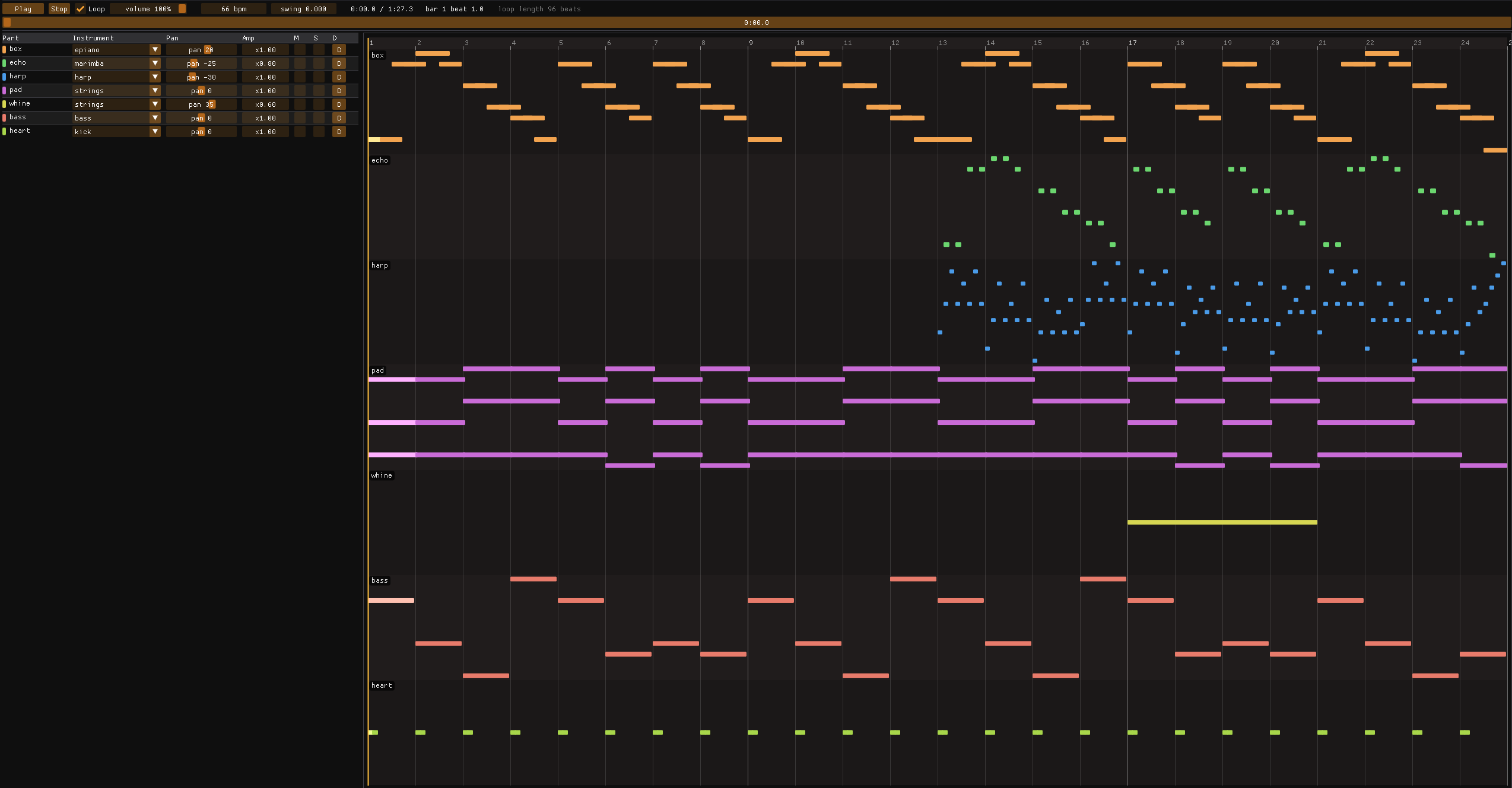
At the start I said one of the questions I get asked is why I do things from scratch myself when I have no experience in that domain. The answer is quite easy. Firstly, because that's how you get experience. It's how I learn to do anything. Secondly, it's fun. I like having fun. You can literally just do things. Does the music compare to the works of Darren Korb? Of course not. But I like it, I learnt a lot, and I had fun making it.
As it turns out, I still remember Twinkle Twinkle Little Star, so I gave it my own twist. Completely coincidential that I've been watching The Traitors... I'm sure that hasn't had an influence on this one at all.
Stay In The Loop
Get notified when new posts are published.